
Back-to-School Family Schedule Reset: How to Organize a Busy Week

What You’ll Learn
A useful back-to-school family schedule shows where each person needs to be, who is responsible, and what happens if plans change. Once school is underway, use your actual weekly routine to update the plan. Start with school hours and work commitments, then fill the gaps around them.
01
What should go on a family calendar after school starts?
Add school start and dismissal times, early-release days, work hours, appointments, and activities that affect other family members. Include travel or departure times when needed. Keep action items, such as signing a permission slip, on a separate task list with deadlines. This keeps the calendar easy to read while keeping responsibilities clear.
02
How do working parents coordinate school pickups?
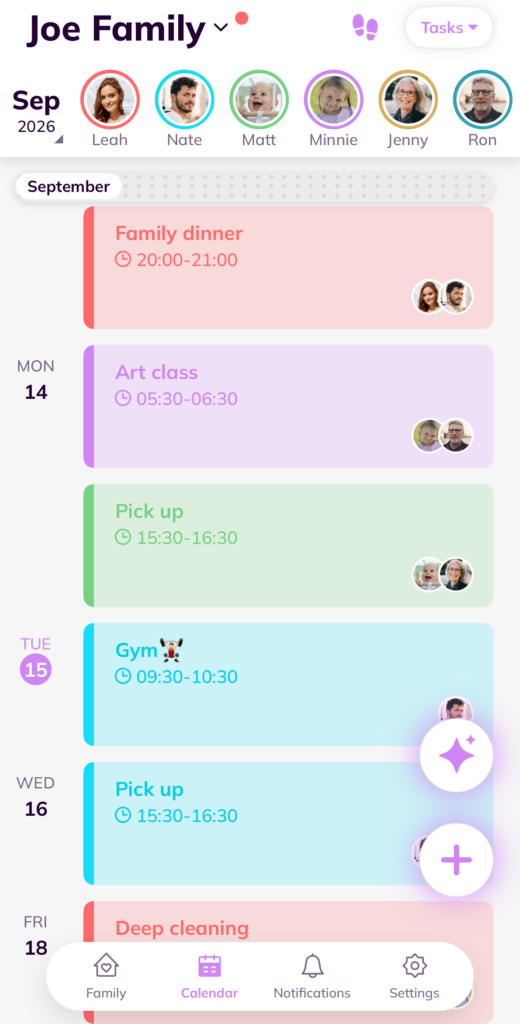
Give each pickup an assigned adult, a location, and a backup contact who has agreed to help. Check the school’s authorized-pickup process. For example, “Tuesday, 3:10 p.m., north gate, Alex; backup: Sam” is more useful than “school pickup.” If the assigned adult changes, get direct confirmation from the replacement.
03
How can parents manage multiple children’s schedules?
Use a consistent name or color for each child and check for overlapping travel times. A 4 p.m. lesson and a 4:15 p.m. game may still conflict if venues are far apart. Work out transportation before adding another activity. Keep one shared calendar that all caregivers check.
04
What belongs in a weekly family schedule reset?
Try this Sunday checklist: review school messages, add schedule changes, assign pickups, choose two easy dinners, check supplies, and leave one open block. Ask each person about one potential conflict. After the first week, adjust the part that didn’t work instead of rebuilding the entire system.

Back-to-School Family Schedule FAQs
What should go on a family calendar after school starts?
Add school times, activities, appointments, pickup plans, and key deadlines. Cubbily keeps everything in one shared family view.
How do working parents coordinate school pickups?
Assign each pickup to a parent or caregiver, include the location and time, and add a backup plan. Cubbily makes ownership clear for everyone.
How can parents manage multiple children’s schedules?
Use separate labels or colors for each child and check for overlapping events and travel time. Cubbily helps families see conflicts early.
What belongs in a weekly family schedule reset?
Review the week, update the schedule, confirm pickups, review activities, and plan key tasks. Cubbily helps the family start each week on the same page.