
How to Set Up a Shared Family Calendar That Everyone Actually Uses
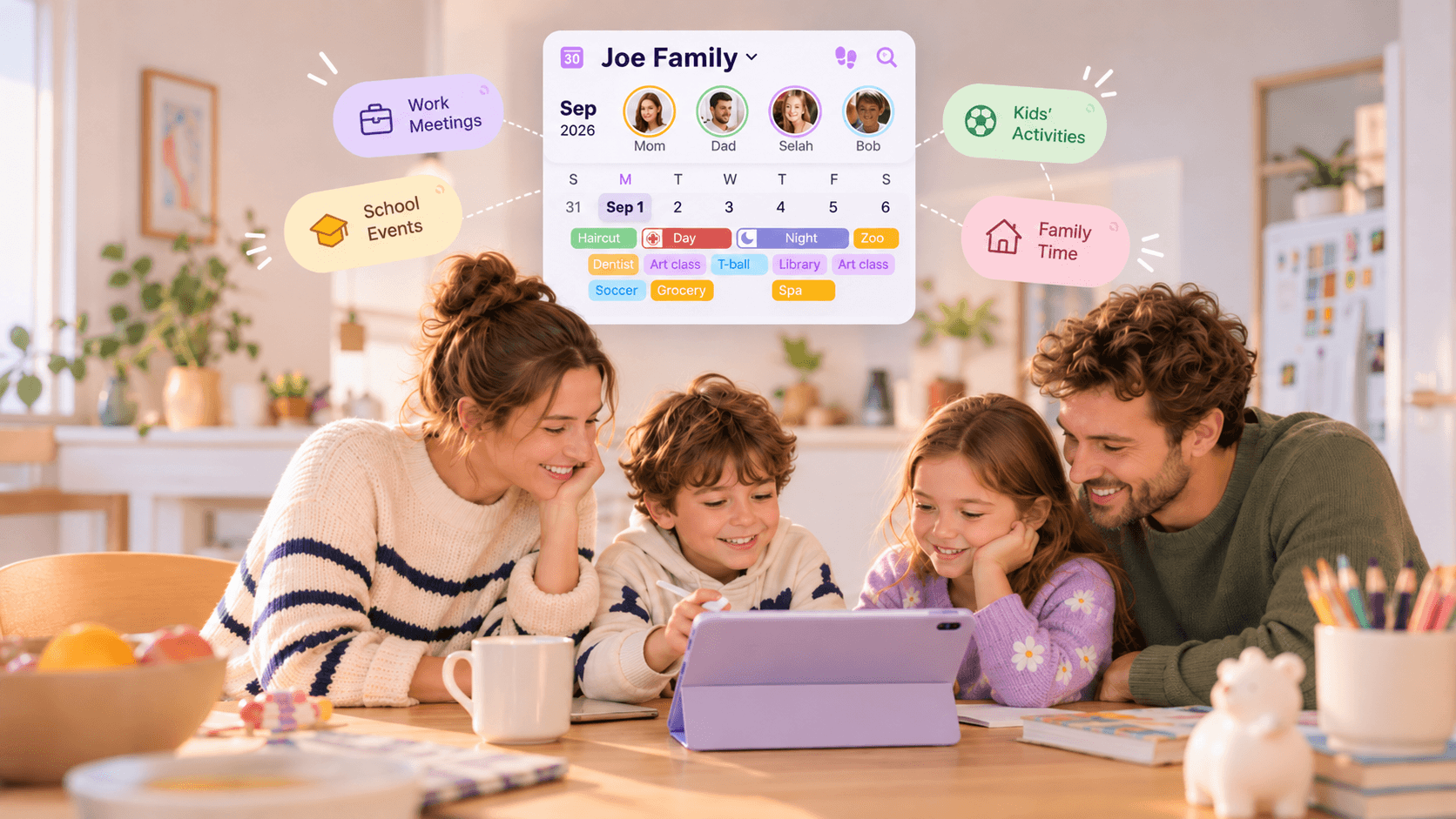
Quick Answer: How Do You Set Up a Shared Family Calendar?
Start with one shared household calendar, assign a consistent color to each family member, add recurring school and work schedules, include who is responsible for pickups and tasks, and set reminders only for events that need action. Then review the next seven days together once a week so changes do not stay hidden in separate messages.
Between school drop-offs, work shifts, sports practices, appointments, and the everyday tasks that keep a household moving, family schedules can become scattered quickly. One parent may have the school email, another may have the soccer time in a text message, and a child’s appointment may only exist in someone’s phone.
A shared family calendar brings those moving parts into one place. The goal is not to track every minute or make everyone use the same personal calendar. It is to give the household one reliable view of the plans that affect more than one person.
1. Start With One Shared View, Not More Calendars
A useful shared family calendar is a coordination layer for the household. It answers five practical questions:
- What is happening? A practice, appointment, shift, school event, or family plan.
- When is it happening? Include the start time, end time, and any travel buffer that matters.
- Who is involved? Identify the family member or members connected to the event.
- Who is responsible? Make pickup, drop-off, preparation, or follow-up ownership clear.
- What changed? Keep cancellations, time changes, and handoffs visible to the people affected.
Personal calendars can still be useful. A parent may keep a private work calendar, and a teenager may prefer a personal view of school assignments. The shared family calendar should contain the information that affects someone else’s time, availability, transportation, or responsibilities.
For example, a meeting that does not affect family plans may stay on a work calendar. A late meeting that means another parent needs to handle pickup belongs in the shared household view.
2. Give Each Family Member One Consistent Color
Color coding makes a busy calendar easier to scan. Choose one color for each person and use it consistently. A simple household setup might look like this:
- Mom: coral or pink
- Dad: teal or blue
- Child 1: yellow
- Child 2: green
- Whole family: purple or a neutral shared color
Try not to create a new color for every type of activity. If soccer is always green one week and blue the next, the calendar becomes harder to interpret. Keep the person color stable, then use the event title or a small label to explain the activity.
Also agree on what a shared event means. A family dinner may involve everyone, while a dentist appointment belongs to one child even if a parent is taking them. The event should show both the person involved and the adult responsible for getting them there.
3. Add Kids’ Recurring Schedules First
Children’s schedules often create the most frequent coordination needs, so add their recurring commitments before filling the calendar with one-off plans. Start with:
- School start and end times, early-release days, and school holidays
- Sports practices, games, music lessons, clubs, and tutoring
- Regular medical, dental, or therapy appointments
- Birthday parties, school performances, field trips, and class events
- Recurring pickup and drop-off arrangements
Do not stop at the activity itself. “Soccer practice, 5:00 p.m.” is useful, but “Soccer practice, 5:00 p.m. — Dad pickup” is much more actionable. If one parent drops off and another collects, record both handoffs.
For recurring events, check the school or activity schedule at the start of each term. Add the regular pattern first, then enter exceptions such as tournament weekends, cancelled lessons, or early dismissal days. This reduces the chance that a family member relies on an old routine after it has changed. For a more detailed activity-by-activity template, see our guide to organizing kids’ sports and activities.
4. Add Parents’ Work Schedules and Availability
A family calendar is incomplete if it only shows the children’s activities. Parents’ availability determines who can handle pickups, meals, bedtime, appointments, and last-minute changes.
Add the work information that affects the household, such as:
- Office days and work-from-home days
- Late meetings, business travel, and weekend on-call periods
- Early starts, overnight shifts, and rotating schedules
- Days off, recovery time, and unavailable hours
Think in terms of availability, not just the name of a shift. A parent may finish a night shift in the morning but need several hours to sleep before taking on school pickup or evening activities. Marking a recovery period can prevent the family from accidentally scheduling over it.
For work events that do not need to be shared, keep the detail private and show only the information the household needs, such as “Unavailable 2–5 p.m.” or “Travel day.” The aim is coordination, not exposing every work detail. Clear schedule visibility also helps couples divide the planning work more fairly; our guide on sharing the mental load during the school year explores the responsibility side of family planning.
5. Set Reminders Carefully
Reminders should help someone take action, not create a constant stream of notifications. Choose them based on how much preparation an event needs.
| Event | Possible reminder | Why it helps |
|---|---|---|
| Doctor appointment | 1 day before and 1 hour before | Time to prepare documents, travel, and leave home. |
| Soccer practice | 30 minutes before | Enough time to get changed and head out. |
| School closure | Several days before | Time to arrange childcare or adjust work plans. |
| Birthday party | 1 day before | Remember the gift, RSVP, or transport plan. |
Not every event needs two alerts. A routine activity may need one reminder, while a deadline that requires preparation may need an earlier alert. If everyone receives every notification, family members may start ignoring them. Assign reminders to the people who need to act. Cubbily’s calendar FAQ explains how reminder recipients are determined by event participants and visibility settings.
6. Separate Calendar Events From Chores and Lists
One common reason family calendars become cluttered is that every responsibility is entered as an event. It helps to distinguish three kinds of information:
- Calendar = when. Soccer practice, a parent’s shift, a school concert, or a family dinner.
- Chore or task = what needs to be done. Pack the sports bag, feed the dog, take out the trash, or prepare a class contribution.
- List = what is needed. Grocery items, school supplies, travel packing, or birthday gifts.
These categories can connect without becoming the same thing. “School bake sale on Friday” is a calendar event. “Buy approved ingredients” is a task. “Flour, apples, paper plates” belongs on a shopping list.
Use a due date for a task when it has a deadline, and assign an owner so it does not silently become one parent’s responsibility. Keep the calendar focused on time-sensitive plans, while lists and chores hold the details of what needs to get done. Cubbily Family Lists are designed for shared grocery lists, chores, packing lists, and household to-dos. For age-based chore ideas, see our family chore chart by age.
7. Work With Google and Apple Calendars Without Duplicating Everything
Many families already use Google Calendar, Apple Calendar, or a work calendar. You do not have to abandon those tools to create a shared household view. The important thing is to decide where each type of information belongs and avoid maintaining two competing versions of the same event.
A practical approach is to keep work-specific details in the work calendar, personal appointments in the relevant personal calendar, and household coordination in the shared family view. If you use calendar sharing or syncing, check which direction updates travel, whether edits are supported, and how recurring events and time zones are handled.
With Cubbily, you don’t have to worry about sharing more than you intend. Its flexible calendar sync settings let you choose which calendars and events to sync, assign family members, and control who can see imported schedules. This way, your family can stay coordinated while keeping personal information private. To learn more, see how Cubbily syncs Google Calendar, Apple Calendar, Outlook, and ICS calendars.
8. Make Rotating Shifts Visible
For nurses, firefighters, emergency workers, hospitality staff, and other shift-working parents, a simple Monday-to-Friday work pattern may not reflect real family availability. Show the shift pattern in a way the whole household can understand. See how a shift calendar for families can bring rotating work hours and family plans into one view, or read the practical example in How Firefighter Families Manage 24/48 Shift Schedules.
For example, a rotating schedule may use distinct blocks for:
- Day shift: working during the day
- Night shift: working overnight
- Day off: not scheduled to work
- Recovery: protected rest after an overnight shift
Then add the family handoff: who handles breakfast, school drop-off, dinner, bedtime, and the next morning. A day off after a night shift may not be the same as a fully available day, so make recovery time visible instead of assuming it is free time.
9. Avoid These Six Common Family Calendar Mistakes
- One parent owns everything. If only one person adds and updates events, the system creates more mental load instead of sharing it. Give every family member an appropriate way to contribute.
- Too many colors and categories. Keep the color system simple and consistent. Add detail in the event title rather than inventing a new category for every activity.
- No one is named as responsible. An event without a pickup owner or task owner can still leave the family guessing. Add the handoff or responsible person.
- Work schedules are missing. Children’s events cannot be coordinated properly if parent availability is invisible.
- Too many notifications. Use reminders for meaningful actions and send them only to the people who need them.
- No regular review. A calendar is only useful if changes are kept current. Set a recurring time to check the next week.
10. Use a 10-Minute Weekly Family Calendar Review
A short weekly review helps keep the calendar accurate without turning family planning into another long meeting. Sunday evening works for many households, but choose a time when the people who coordinate schedules can participate.
Use the same five-step routine each week:
- Look seven days ahead. Scan school, work, activities, appointments, and family plans.
- Check for conflicts. Look for overlapping shifts, pickups, meetings, and travel time.
- Confirm ownership. Make sure each pickup, drop-off, and preparation task has a person responsible.
- Update changes. Add new events, remove cancellations, and adjust reminders.
- Share the plan. Make sure everyone knows the important changes for the coming week.
Keep the review practical. You do not need to discuss every event in detail—focus on what changed, where help is needed, and what could cause a conflict.
Example: A Shared Family Week
| Day | What is happening | Who is responsible |
|---|---|---|
| Monday | Mom works 7 a.m.–7 p.m.; Child 1 has soccer at 5 p.m. | Dad handles pickup and soccer transport. |
| Tuesday | Dad has a late office day; dentist appointment at 4 p.m. | Mom takes the child to the dentist. |
| Wednesday | School early release. | Grandma handles pickup. |
| Thursday | Mom works a night shift. | Dad handles dinner and bedtime; recovery time is protected the next morning. |
| Friday | Whole-family movie night. | Everyone keeps the evening free. |
Shared Family Calendar Setup Checklist
Use this checklist when setting up your calendar for the first time or resetting it at the start of a new school term:
- Assign one color per family member
- Add recurring school schedules
- Add parent work schedules and shifts
- Add kids’ activities and appointments
- Assign pickup and drop-off owners
- Set reminders for important events
- Keep chores and lists separate from events
- Review the coming week together
Frequently Asked Questions
What is the best way to create a shared family calendar?
Start with one shared household view, give each person a consistent color, add recurring school and work schedules, assign responsibility for transportation and tasks, and review the next week regularly. The best setup is the one everyone can understand and update.
Should each family member have a color?
Yes, a simple color per person makes it easier to see whose schedule is affected. Keep the colors consistent and use a separate shared-family color for events involving everyone.
What should go on a family calendar?
Include events that affect another person’s time or availability: school dates, activities, appointments, work shifts, travel, family plans, and pickup or drop-off arrangements. Keep shopping items and task details in lists or chore tools.
Can families use Google or Apple calendars?
Yes. Families can use the sharing and calendar features available in their existing tools. Decide which calendar is the source of truth for each event type, and check sync and permission settings to avoid duplicates.
How do rotating shifts fit into a shared family calendar?
Show day shifts, night shifts, days off, and recovery time as distinct blocks. Then add the family responsibilities that need to move around those shifts, such as school transport and bedtime.
How do you get everyone to keep using it?
Make updates easy, keep categories simple, assign clear responsibilities, avoid unnecessary notifications, and hold a short weekly review. A calendar is more likely to stick when it solves coordination problems for every member—not just the person who manages it.
Related Articles
How Busy Couples Can Share the Mental Load During the School Year