
Introducing Cubbily AI Event Capture: Add Calendar Events from Photos or Voice
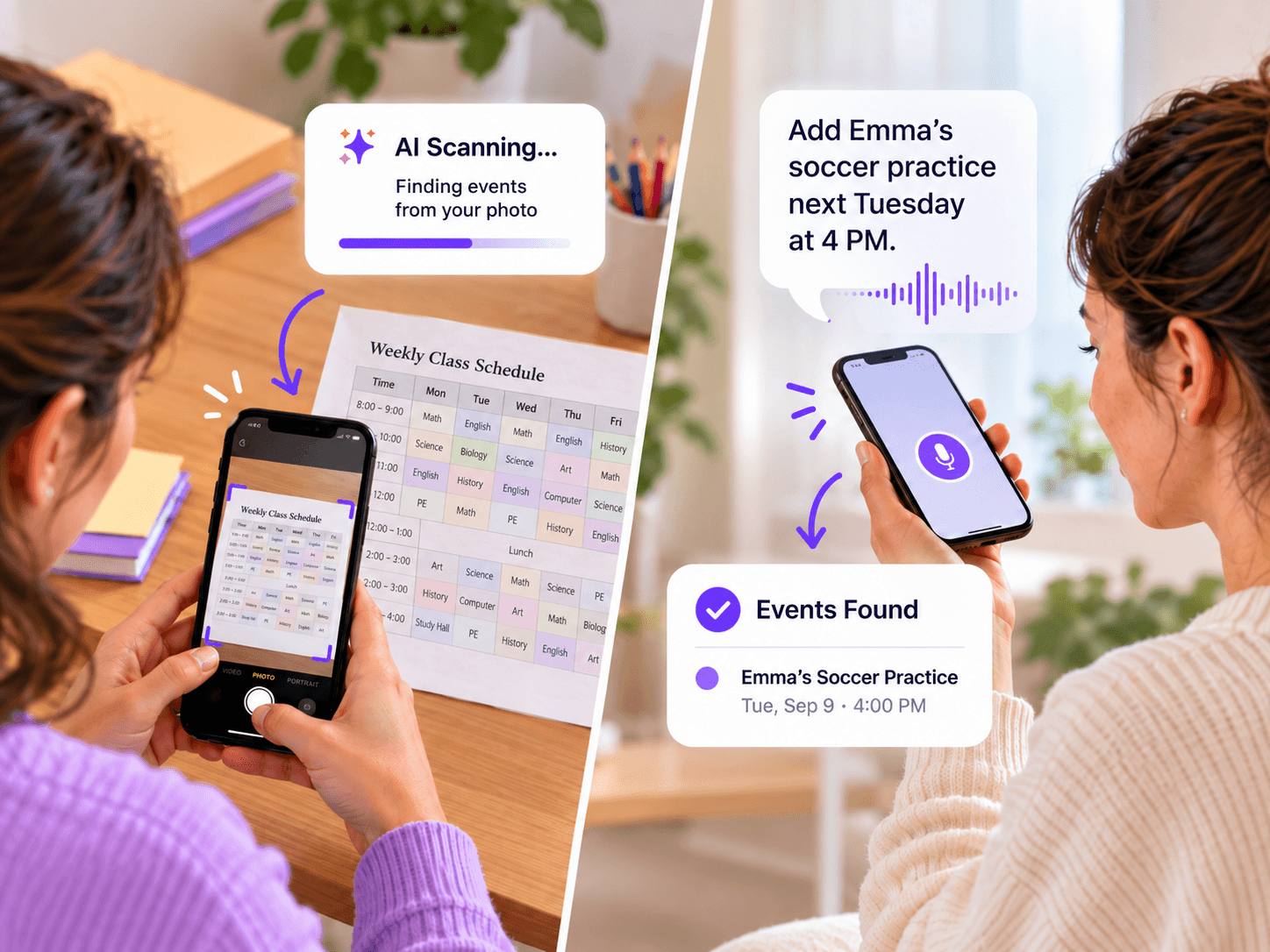
Family life comes with a lot of schedules. School activities, work shifts, appointments, sports practices, and everyday plans all need to find their way onto the calendar.
But keeping everything updated often means manually entering dates, times, and event details — sometimes over and over again.
What if adding events to your family calendar could be as simple as taking a photo or saying a few words?
Meet Cubbily AI Event Capture, a smarter, easier way to create calendar events using AI.
Whether you have a school timetable, a work schedule, or a quick plan to remember, Cubbily AI helps turn that information into calendar events with less typing and less effort.
Less manual entry. Less hassle. More time for family.
What Is Cubbily AI Event Capture?
Cubbily AI Event Capture is an AI-powered calendar feature that helps you create events from photos or natural voice input.
Instead of typing every event title, date, and time manually, you can let AI recognize scheduling information and prepare calendar events for you.
There are two simple ways to use it:
- AI Photo Input: Take a photo of a schedule or choose an existing image from your phone’s gallery. Cubbily AI helps recognize the dates, times, and activities.
- AI Voice Input: Describe your plans in everyday language, and Cubbily AI helps turn your words into a calendar event.
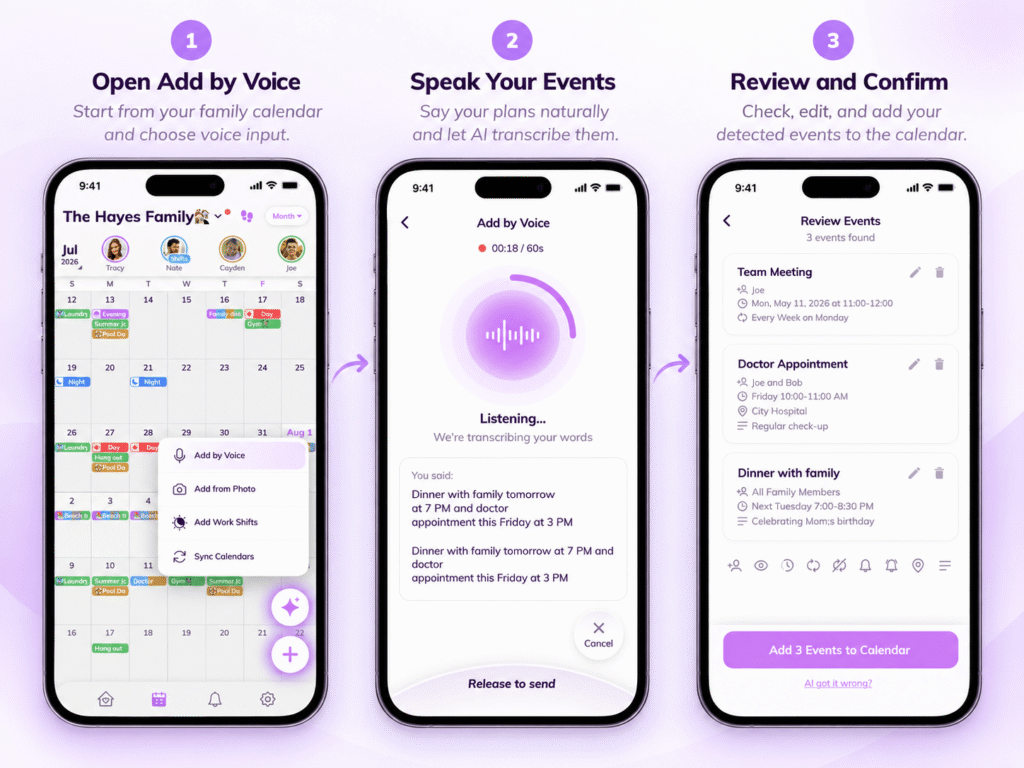
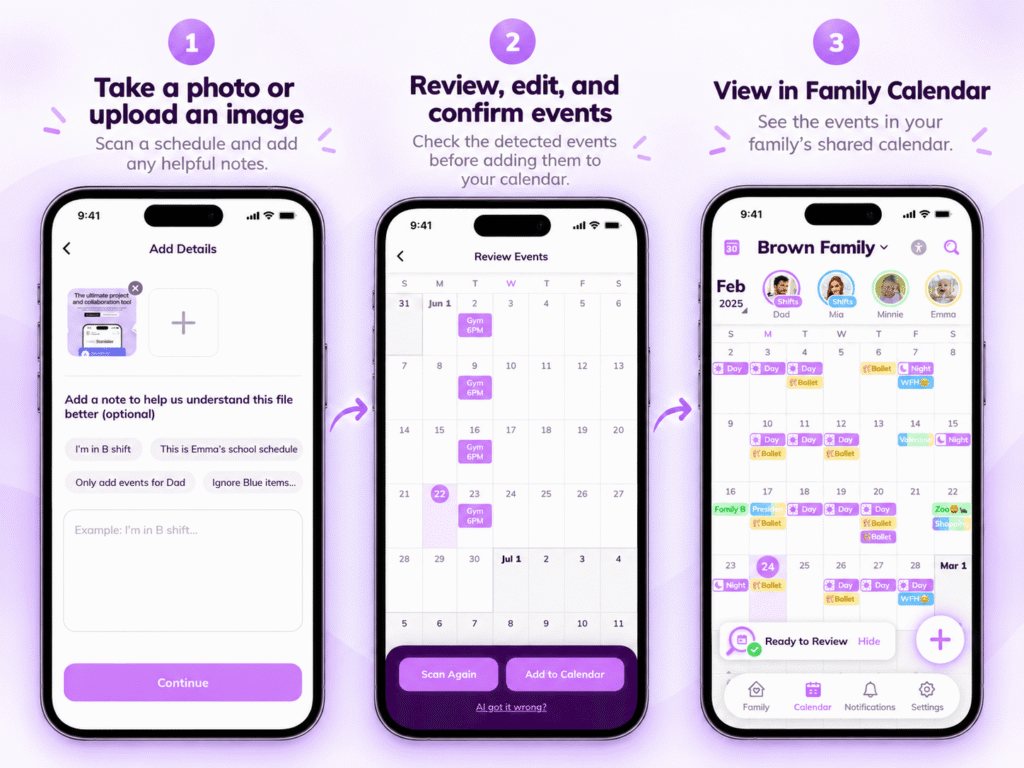
You can review and edit the suggested details before saving them to your shared family calendar.
It’s a more convenient way to handle everyday scheduling, especially when your family has a lot going on.
AI Photo Input: Turn a Photo into Calendar Events
School timetables, work rosters, activity notices, and appointment reminders often contain information you need to add to your calendar.
The problem? That information usually needs to be entered manually.
With Cubbily AI Photo Input, you can take a photo or select an existing picture from your phone’s gallery and let AI help with the rest.
How to Add Calendar Events from a Photo
- Take or choose a photo. Capture a printed schedule with your camera, or select a saved photo or screenshot from your gallery.
- Let AI recognize the details. Cubbily helps identify relevant information, such as event names, dates, and times.
- Review the suggested events. Check the recognized details and make any changes if needed.
- Add events to your calendar. Save the events to your Cubbily family calendar.
No need to start from scratch every time a new schedule arrives.
One Photo, Less Manual Work
Imagine receiving a school activity schedule with several upcoming events.
Normally, you’d need to read through the schedule, open your calendar, and enter each activity individually.
With Cubbily AI, you can simply photograph the schedule or choose a picture you’ve already saved.
AI helps recognize the activities and prepare calendar events for you to review.
The same approach is useful for:
- School schedules: Class activities, school events, and extracurricular programs.
- Work shift rosters: Changing shifts and irregular working hours.
- Sports and activities: Practice sessions, lessons, and upcoming events.
- Appointment notices: Medical appointments, meetings, and other scheduled commitments.
If you’re managing a busy school term, explore our Back-to-School Family Schedule Guide for more ways to keep family routines organized.
Instead of repeatedly copying information from a picture into your calendar, you can let AI help with the tedious part.
AI Voice Input: Just Say It, and Add It
Not every plan comes from a schedule or a photo.
Sometimes you remember an appointment, make a new plan, or need to add something to your calendar quickly.
Typing out the details can feel unnecessary when you already know what you want to add.
With Cubbily AI Voice Input, you can simply say your plans out loud.
For example:
“Add Emma’s soccer practice next Tuesday at 4 PM.”
Or:
“Schedule a dentist appointment for Friday at 10 AM.”
Cubbily AI helps interpret your words and prepare a calendar event using the information you’ve provided.
Review the details, make any adjustments, and save the event.
No need to manually fill in every field when you can simply say what you need.
Voice input makes adding events feel more natural, whether you’re organizing tomorrow’s plans or remembering something during a busy day.
Why Use AI to Create Calendar Events?
AI Event Capture isn’t just about adding a new way to enter events. It’s about making an everyday task easier.
Spend Less Time on Manual Entry
Adding one appointment manually might only take a moment. But entering an entire school schedule or a changing work roster can quickly become repetitive.
AI helps reduce the work of copying event names, dates, and times one by one.
Use the Information You Already Have
Schedules often arrive as printed notices, screenshots, or photos shared in family messages.
Rather than retyping information that’s already available, you can use a photo to help create calendar events.
Add Plans More Conveniently
Sometimes taking a photo is easiest. Other times, speaking a quick sentence feels more natural.
With photo and voice input, you can choose the method that works best for the situation.
Make Family Scheduling Less of a Chore
Keeping a family calendar updated is important, but managing it shouldn’t take more time than necessary.
AI helps simplify event creation so you can focus less on calendar administration and more on your day.
Made for Busy Families and Real-Life Schedules
Every family manages time differently. Cubbily AI Event Capture is designed to make adding events easier across different routines.
For Parents Managing School Activities
Between school events, sports practices, extracurricular activities, and appointments, parents often have a lot of dates to keep track of.
Take a photo of a school schedule or choose an image you’ve already received, and let AI help prepare the events.
For Shift Workers and Their Families
When work hours change every week, keeping a family calendar updated can be challenging.
A photo of a work roster can help turn shift information into calendar events, reducing repetitive manual entry and making it easier to coordinate work and family plans.
For more ways to organize rotating schedules alongside family commitments, explore Cubbily’s Shift Calendar for Families.
For Couples Managing Shared Plans
From weekend activities to appointments and family gatherings, plans can change throughout the week.
Voice input offers a convenient way to add an event when it comes to mind.
For Families with Multiple Children
When each child has different school activities, lessons, and appointments, even a small scheduling task can add up.
AI photo input helps make it easier to bring those activities into one family calendar.
From AI Event Creation to a Shared Family Calendar
Creating an event is only the beginning. Keeping everyone informed is what makes a family calendar useful.
Once you’ve reviewed and saved your AI-generated events, Cubbily’s Family Shared Calendar helps you organize those plans alongside the rest of your household’s schedule.
School activities, appointments, work shifts, and family commitments can all be managed in one place.
Combined with family calendar sharing, reminders, and shift scheduling tools, AI Event Capture makes it easier to go from scattered scheduling information to an organized family calendar.
AI helps you add the events. Cubbily helps your family stay organized.
Less typing. Less hassle. More time for family.
Ready to simplify your scheduling?
Unlock AI Event Capture with Cubbily PRO and make everyday family planning easier.
FAQs
Do I need to review AI-generated calendar events?
Yes. Cubbily allows you to review and edit AI-generated event details before saving them. Checking dates, times, and activities helps ensure the information is accurate and your family calendar stays organized.
Can AI create multiple calendar events from a schedule?
Yes. Cubbily’s AI photo recognition is designed to help users identify scheduling information and prepare multiple calendar events from schedules such as school timetables and work rosters. Review the recognized events before saving.
Can I create calendar events using my voice?
Yes. Cubbily AI Voice Input lets you describe a plan in natural language. AI uses the spoken information to prepare a calendar event, reducing the need to enter details manually.
Does Cubbily automatically share AI-created events with my family?
After you review and save an event to your shared family calendar, Cubbily’s family sync functionality helps keep relevant schedules updated across family members’ devices. Event visibility depends on the calendar and participant settings.